What Is a Color Profile and Why It Matters for Prints

A color profile is a digital map that translates color values from a screen or design file into the specific colors a printer can produce. Proper color management ensures the final printed label matches the intended brand appearance, reducing waste and reprints across different printers and substrates.
- A color profile maps digital color values to the physical capabilities of a specific printing process and substrate.
- Without a consistent profile, the same digital file can produce noticeably different colors on different printers or label stocks.
- Using the correct ICC profile for each production step is a primary control point in professional color management.
- Requesting a printed proof calibrated to the same profile as production is a practical way to verify color consistency before running.
- Documenting the profile used in the artwork and production instructions prevents mismatches during sourcing and handoff.
What is a color profile in simple terms
A color profile is a set of instructions that tells a computer how to interpret and reproduce a specific color. Every device, from a design monitor to a printing press, has its own limits and quirks. A profile bridges the gap between the color you see on screen and the color that comes off the press.
In label printing, this matters because the final product depends on a chain of devices and materials. A designer creates an artwork file. A printer converts that file into ink or toner. The ink is applied to a specific label stock. If the profile used at any step is wrong, the final label will not match the intended color.
The profile acts as a translation layer. It describes the color space of a device or process. For example, a profile for an offset press on a specific type of coating describes how that press renders cyan, magenta, yellow, and black inks. A profile for a digital press on uncoated paper describes a different set of limits.
Why color consistency fails in production
Inconsistent color in label runs usually comes down to a mismatch between the assumed and the actual production profile. A buyer may approve a screen file using one color interpretation. The printer may produce using a different one. The result is a label that is acceptable to the designer but off from the buyer’s standard.
This is not a failure of the printer. It is a failure of communication. The buyer and the printer need to agree on the same color standard before work begins. In practice, that means agreeing on the profile that will be used for the final production run.
Common mistakes include using a generic profile for a specialty stock. A profile designed for standard coated paper will not accurately predict the color on a glossy polypropylene or a uncoated paper. The substrate changes how the ink behaves. The profile must reflect that behavior.
Another mistake is assuming that a profile is universal. A profile is not a property of the ink alone. It is a property of the entire system. The same ink on different substrates, at different ink densities, with different drying conditions, will produce different results. The profile captures that specific combination.
How profiles affect sourcing decisions
When sourcing label stock or choosing a printer, the profile changes the decision. If you need a specific brand color that requires a particular substrate, you must ensure the printer can reproduce it with the correct profile. A supplier who can match the color on standard coated stock may not be able to match it on the specialty material you need.
The profile also affects proofing. A digital soft proof on a screen is only useful if it uses the same profile as the intended production process. A proof printed on a different stock or press without the correct profile is a different document. It may be useful for layout checks, but it is not a reliable color standard.
When comparing suppliers, ask which profile they use for a specific stock. If a supplier quotes a price for a specialty label, clarify the color management approach. Do they use a standard ICC profile for that stock? Do they use a custom profile created for your specific ink and substrate combination? The answer affects the risk of a color mismatch.
A table shows how different production steps rely on different profiles.
| Production Step | Typical Profile Type | Why It Matters |
|---|---|---|
| Design and Screen | Display ICC Profile | Ensures the designer sees a color that approximates the intended output. |
| Digital Prepress | Print ICC Profile | Converts the digital file into ink values that match the press capability. |
| Offset Production | Press ICC Profile | Maps the ink limits of the specific press and substrate combination. |
| Digital Production | Device ICC Profile | Maps the toner or ink limits of the specific digital press. |
| Final Verification | Reference ICC Profile | Provides a standard for measuring the final printed result. |
The role of ICC in color management
ICC stands for International Color Consortium. It is the organization that developed the technical framework for color profiles. ICC profiles are the standard file format used to store the data that defines a color space.
In label printing, you will encounter ICC profiles in two main forms. The first is a device profile. This describes a specific piece of hardware, such as a particular monitor or a specific press configuration. The second is a process profile. This describes the color output of a printing method, such as four-color offset on coated paper.
Using an ICC profile is not a one-time action. It is a continuous part of the workflow. The profile must be selected and applied at each stage. If you design on a monitor, you use the monitor profile. When you send the file to the printer, the printer applies its production profile. When you check the final run, you compare it against a reference profile.
The profile file itself is a small data file. It contains curves and matrices that transform color values from one space to another. The complexity of these transformations varies. A simple profile might just shift values. A complex profile might involve multiple steps and conditional rendering. For most buyers, the exact math inside the file is not the concern. The concern is ensuring the right file is used at the right stage.
A worked example: matching a brand color on a specialty stock
Imagine a buyer needs a label for a premium product line. The brand color is a deep, saturated blue. The label will be printed on a matte polypropylene stock, which is chosen for its durability and chemical resistance.
The designer creates the artwork in a standard color space, often sRGB or a wider space for screen display. The file is sent to the printer. The printer reviews the file and identifies the production stock. They know that matte polypropylene absorbs ink differently than standard coated paper. The blue in the file, which looks vibrant on the designer’s screen, may come out duller on the polypropylene.
The printer selects a specific ICC profile for that stock. This profile might be a custom profile created by the printer’s color team, or it might be a standard profile from the substrate manufacturer. The profile tells the print engine how to adjust the ink amounts so the final printed blue matches the target.
The printer then produces a test sheet. This sheet is not printed with the generic profile. It is printed with the selected profile for the polypropylene. The buyer reviews the test sheet. If the blue is too light, they may request a slight adjustment to the ink limits or a different profile. If the blue is correct, the test sheet becomes the reference for the production run.
Without this step, the buyer might approve a screen file and then receive a run that is noticeably off. The difference might be small, but on a premium product, it is visible. It is also a financial risk. If the first run is off, the cost is not just the material. It is the time, the rework, and the potential delay in shipping.
Practical steps for color management in label production
Color management is a discipline. It requires discipline in the workflow. The following steps form a practical approach for buyers and producers.
- Agree on the production profile before artwork finalization. Tell the printer the stock and the press type. Ask them to provide the profile they will use.
- Use the same profile for soft proofs and hard proofs. If you use a digital proofing service, ensure they use the production profile, not a generic one.
- Keep a physical reference. A printed test sheet approved by the buyer is a tangible standard. It is easier to compare a new run against a physical sheet than to compare it against a screen image.
- Document the profile in the job instructions. Include the profile name and version in the production order. This creates a record for future runs and helps prevent drift over time.
- Re-check profiles when the substrate or press changes. If you switch to a new supplier or a new stock, the old profile may not apply. Request a new profile and a new test sheet.
These steps do not require deep technical knowledge. They require clear communication. The profile is the bridge. If the bridge is built correctly, the color crosses from the screen to the label as intended.
Common questions about color profiles in label printing
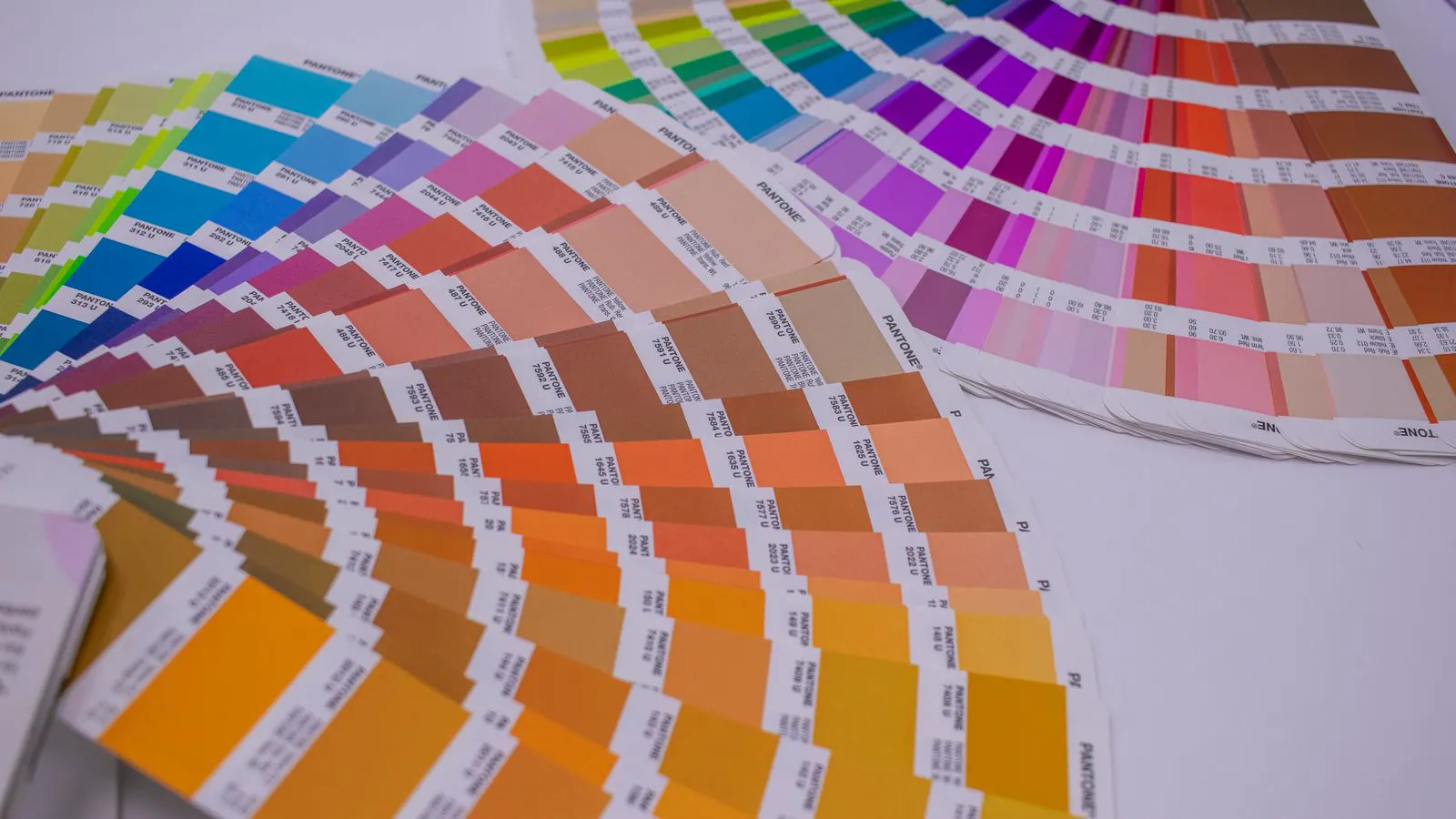
Is a color profile the same as a Pantone color?
No. A Pantone color is a specific standard color. A color profile is a tool that describes how a printer can produce that color on a specific material. You can have a Pantone color spec and still need a correct profile to print it accurately.
Do I need a custom profile for every label?
Not necessarily. Many printers use standard profiles for common stocks. Custom profiles are typically created when the substrate is unusual or when the color requirements are extremely tight. For most standard label stocks, a well-maintained standard profile is sufficient.
Can I use the same profile for offset and digital printing?
No. Offset and digital printing use different technologies and have different ink or toner behaviors. A profile created for an offset press will not accurately predict the output of a digital press. Each process requires its own profile.
What if I change the printer but keep the same stock?
You should still verify the color. Different printers have different ink delivery systems, even on the same stock. The new printer may use a different profile for that stock. A test sheet is the only way to confirm the color remains consistent.
How often should profiles be updated?
Profiles are generally stable, but they can drift if the press is recalibrated, if the ink batch changes, or if the substrate supplier changes a formula. A regular check with a test sheet is a good practice. If you notice a shift in color over time, request a review of the profile.
Frequently asked questions
What is the main purpose of a color profile in label printing?
A color profile translates digital color values into the specific ink or toner output of a printer. It ensures the printed label matches the intended color on the chosen stock.
How does a color profile affect the cost of a label run?
A correct profile reduces the chance of a color mismatch on the first run. This avoids the cost of reprints, rework, and potential delays that come from shipping the wrong color.
Can I send a file without specifying a profile?
You can, but the printer will apply a default profile. This may not match your intended color. It is safer to specify the profile or request a proof using the production profile.
What is the difference between a monitor profile and a press profile?
A monitor profile describes how a screen displays color. A press profile describes how a printer produces color. They are used at different stages of the workflow to bridge the gap between screen and print.
Do small label runs need color management?
Yes. Even small runs require a consistent color. The principles of profile selection and proof verification are the same for a short run or a long run. The risk of waste is higher on small runs because there is less volume to average out.